WordPress vs Webflow (2026): Three-Year Cost, Lock-In and Who Maintains It
WordPress vs Webflow is decided by who will maintain the site, not by which editor feels nicer. Choose Webflow if a designer or a marketing team wants to ship and edit pages with nobody patching plugins, and the content fits inside Webflow's 20,000-item CMS. Choose self-hosted WordPress if you need plugins Webflow has no answer to, content or a catalogue beyond Webflow's caps, or the freedom to change hosts without rebuilding, and someone will actually keep it updated.
On money, the two roads are closer than either camp likes to admit. Over three years a CMS site costs $900 on Webflow Premium and anywhere from $467.64 to $1,050 on WordPress, depending on the host and whether you add a premium page builder. We read every price on the vendors' US pricing pages on 10 October 2026; all are yearly-billing rates, excluding tax.
What each one is in 2026
WordPress is free, open-source software that runs on whatever hosting you choose to rent. The current release on 10 October 2026 is 7.1.3, and W3Techs counted it on 40.1% of all websites on 9 October. You choose the host, the theme, the editor (the built-in block editor or a builder such as Elementor) and every plugin, and you, or whoever you pay, keep all of it updated.
Webflow is a visual design tool welded to its own hosting; W3Techs puts it on 0.8% of websites. Each site carries its own plan. Basic, at $15 a month, allows 300 static pages and no CMS; Premium, at $25, brings the CMS along with site search and file uploads in forms. Ecommerce runs on separate plans, and team seats are billed on top of the site plan. The editor works with real CSS concepts, boxes, classes and breakpoints, so a designer gets precise control and a beginner gets a learning curve.
Three-year cost: WordPress at renewal prices against Webflow
The fair way to compare a subscription with a kit is over three years, with hosting at the price it renews at rather than the headline rate. We left the domain out because it costs the same on either road. For WordPress we priced the free block editor, and one route with Elementor's Advanced Solo licence at $84 a year for people who want a drag-and-drop builder.
- SiteGround StartUp with the block editor: $35.88 for the first 12 months, then $215.88 a year, so $467.64 over three years.
- SiteGround GrowBig with Elementor Advanced Solo: $59.88, then $359.88 a year for hosting, plus $252 of licences, so $1,031.64.
- Rocket.net Starter with the block editor: $300 a year on annual billing, so $900.
- Kinsta Single with the block editor: $350 a year, so $1,050 if the price holds, since Kinsta prints no renewal figure.
- Webflow Basic, Premium and Ecommerce Standard: $540, $900 and $1,044, with no first-year discount to unwind.
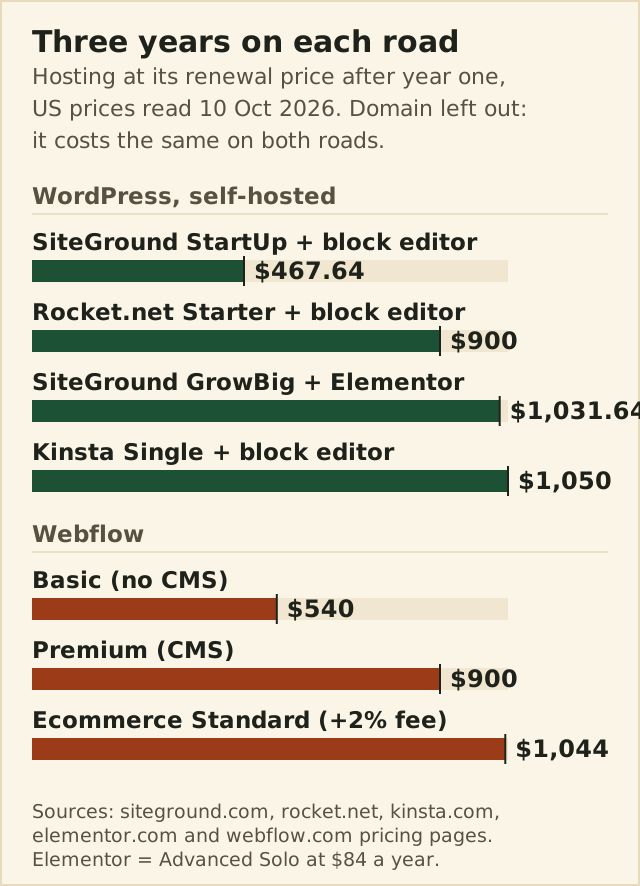
Two things stand out. The cheapest road is WordPress on a budget host with the free editor, and the price of that saving is your own time. And Webflow Premium costs exactly what Rocket.net Starter does, $900 over three years, which turns the choice into the one this page is really about: who does the work. Our real cost of WordPress breakdown shows the same kind of arithmetic against Squarespace and Wix.
| Option | First year | After year one | What you get |
|---|---|---|---|
| Webflow Basic | $180 | $180 | Up to 300 static pages, no CMS |
| Webflow Premium | $300 | $300 | CMS with 20,000 items, site search |
| Webflow Ecommerce Standard | $348 | $348, plus a 2% fee on sales | 500 items |
| SiteGround StartUp | $35.88 | $215.88 | 1 site, 10 GB |
| SiteGround GrowBig | $59.88 | $359.88 | Unlimited sites, 50 GB |
| Rocket.net Starter | $300 | $300, no renewal increase stated | 1 install, 10 GB, 50 GB bandwidth |
| Kinsta Single | $350 | Not stated | 1 install, 35,000 visits |
| WP Engine Essential | From $336 | Not published | 1 site, 25,000 visits |
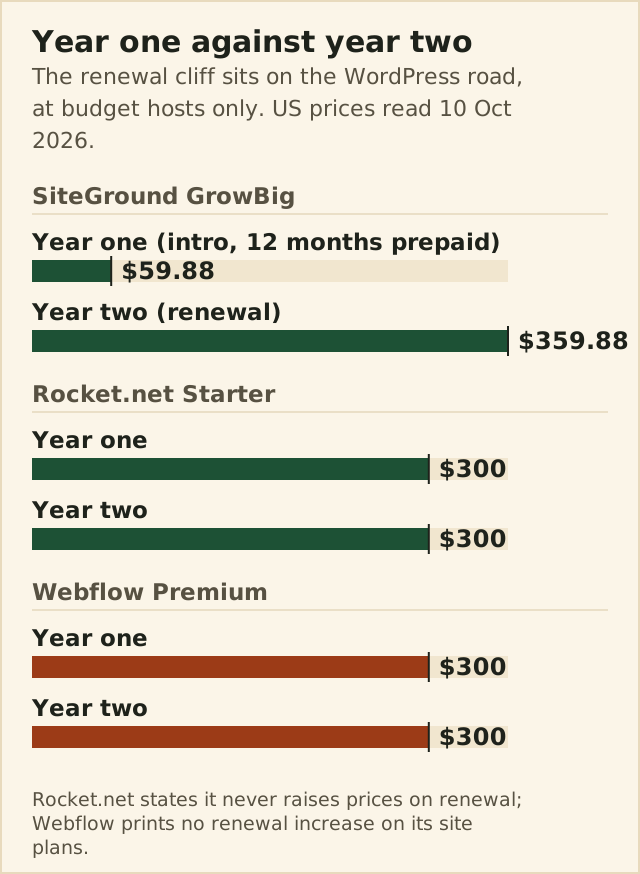
The renewal column is where WordPress budgets go wrong. SiteGround's GrowBig plan costs $59.88 for its first prepaid year and $359.88 in its second, six times as much, while Webflow's site plans print no renewal increase at all. Premium managed hosts close that gap: Rocket.net states in writing that it never raises prices on renewal, and WP Engine publishes a first-year price for new customers but no renewal figure, so budget at list.
Maintenance and security: hours, not adjectives
This is the real difference between the roads. On Webflow, hosting, security patches and platform updates are the vendor's job, and there are no plugins to keep current. On WordPress they are yours. Patchstack's report on 2025 counted 11,334 new vulnerabilities in the WordPress ecosystem; plugins accounted for 91% of them and themes for 9%, while WordPress core had just six. The report puts the weighted median gap between disclosure and the first exploit attempt at five hours. The software is not the weak point; the plugins you choose are, and so is the gap between a fix shipping and you applying it.
In hours, our own estimate rather than a study: a small site on a managed host with automatic updates takes 15 to 30 minutes a month; manual updates with a staging check take one to two hours; cleaning up after a plugin conflict or a hack runs to between four and twenty hours nobody planned for. On Webflow the routine figure is close to zero. If that list of hours has nobody's name next to it, read our guide to when WordPress is overkill before you go any further.
Design control and editors for clients
Webflow gives designers more direct control than any WordPress builder short of writing code, because its editor is a visual layer over HTML and CSS. For handover, Webflow sells seats: a full seat costs $39 a month and a limited seat, for people who edit content or build pages from existing components, costs $15, both on yearly billing. That is clean for a client who should change words but not layouts, and it adds up for a team.
WordPress has user roles built in, Administrator, Editor, Author and Contributor among them, and they cost nothing however many people you add. The editing experience depends on what you install: the block editor is simple and fast for content, while Elementor or Divi bring a visual canvas closer to Webflow's, with the licence costs our page builder roundup lists.
CMS scale and SEO controls
Webflow's CMS is the right size for marketing sites and blogs. Premium holds 20,000 items across 40 collections, with reference fields between them, and its templates turn each collection into pages. Past that ceiling you are into custom or enterprise territory. WordPress has no item cap; the practical limits are your hosting and your database, and custom post types and fields let you model anything from property listings to course catalogues.
On SEO, both cover the fundamentals: editable titles and descriptions, clean URLs, redirects and sitemaps. Webflow's markup is clean by default because a designer controls it directly. WordPress reaches further through plugins and server access, schema, redirects at scale, caching rules and log files, which matters when organic search is the whole acquisition plan. For an ordinary business site, neither road will hold rankings back.
Ecommerce: WooCommerce against Webflow Ecommerce
Webflow sells three store plans, priced per month on yearly billing: Standard at $29, capped at 500 items and charging a 2% Webflow fee per sale, Plus at $74 for 5,000 items with no fee, and Advanced at $212 for 15,000 items. Card processing comes on top. WooCommerce is a free WordPress plugin with no item cap; with WooPayments, US cards cost 2.9% plus $0.30 per transaction, with 1.5% more on international cards, and paid extensions such as Subscriptions, at $279 a year, add up quickly.
A small catalogue on Webflow Standard is simple and pays for itself in time saved, but the 2% fee is a real tax on a busy store, and Plus costs $74 a month to remove it. A catalogue in the thousands, subscriptions, wholesale pricing or anything unusual points to WooCommerce, with the maintenance that comes with it.
Leaving: export, migration and lock-in
WordPress is the exit-friendly road. Its built-in export produces a file of your posts, pages and comments, the database and files are yours, and managed hosts compete on free migrations: SiteGround offers a free WordPress transfer and Rocket.net unlimited free migrations. Moving host is a chore rather than a rebuild.
Webflow's exit is partial. With any paid Workspace plan, from Core at $19 a month, you can export a site's static HTML, CSS, JavaScript and assets, which is a genuine way out for a brochure site. The export leaves dynamic parts behind, CMS content, ecommerce data, user accounts and form handling among them, so a content-heavy Webflow site that leaves becomes a rebuild with a content import.
Which road to take
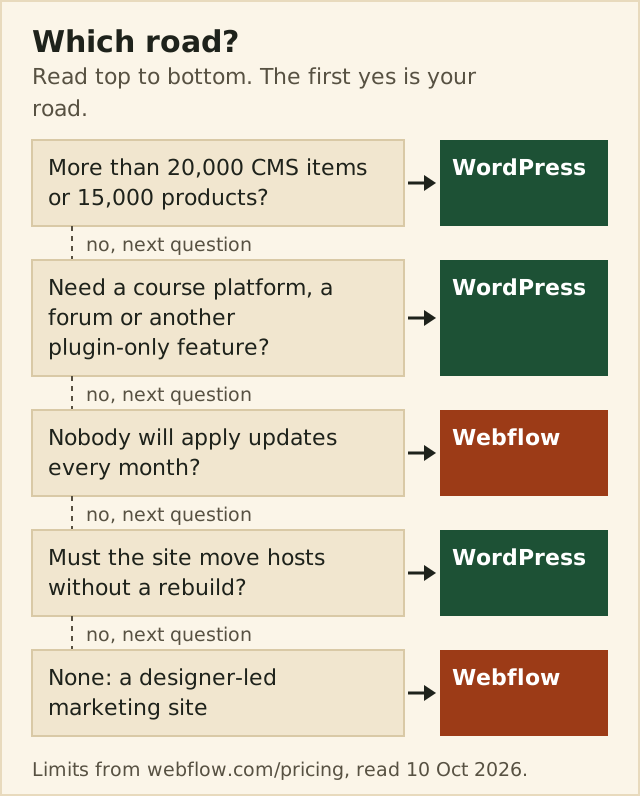
If the ladder sent you to Webflow, start on Premium if you need a blog or any collection of pages, and price seats before you promise a client access. Webflow's plans bill per site, so a second site is a second plan. If it sent you to WordPress, buy the host on its renewal price rather than its first-year rate: Rocket.net is the flat-price option, Kinsta the premium managed one, and SiteGround the budget route if you note the year-two price in your calendar now.
Edge cases
- A designer handing sites to non-technical clients: Webflow, with limited seats for the clients, unless the site needs a plugin-only feature.
- A blog heading past 20,000 posts: WordPress, before migration gets expensive.
- Several small sites for one owner: WordPress on a multi-site plan such as GrowBig, because Webflow bills each site separately.
- A marketing team with a developer on call: either road works; choose on who will edit day to day.