Elementor vs Divi (2026): Divi 5 Against Elementor 4, Priced by the Number of Sites You Run
Elementor vs Divi comes down to how many sites you run. On one site, Elementor's Advanced Solo plan at $84 a year buys the larger ecosystem and the easier handover to whoever looks after the site next. From three sites up, Divi's $89 membership, or $249 paid once, covers every site you will ever build, and the arithmetic stops being close. All prices come from each vendor's US pricing page as it stood on 10 October 2026.
Both products changed underneath in 2026, which is why older comparisons now mislead. Divi 5 replaced Divi's shortcode engine in February, and Elementor 4.0 made its new Atomic editor the default for new sites in March. Skip both if your site is content-led and the free block editor already does the job. Skip Divi if a client will hire the next freelancer off a job board; skip Elementor if you are about to build your fourth site.
What changed in 2026: Divi 5, Elementor 4 and Elementor One
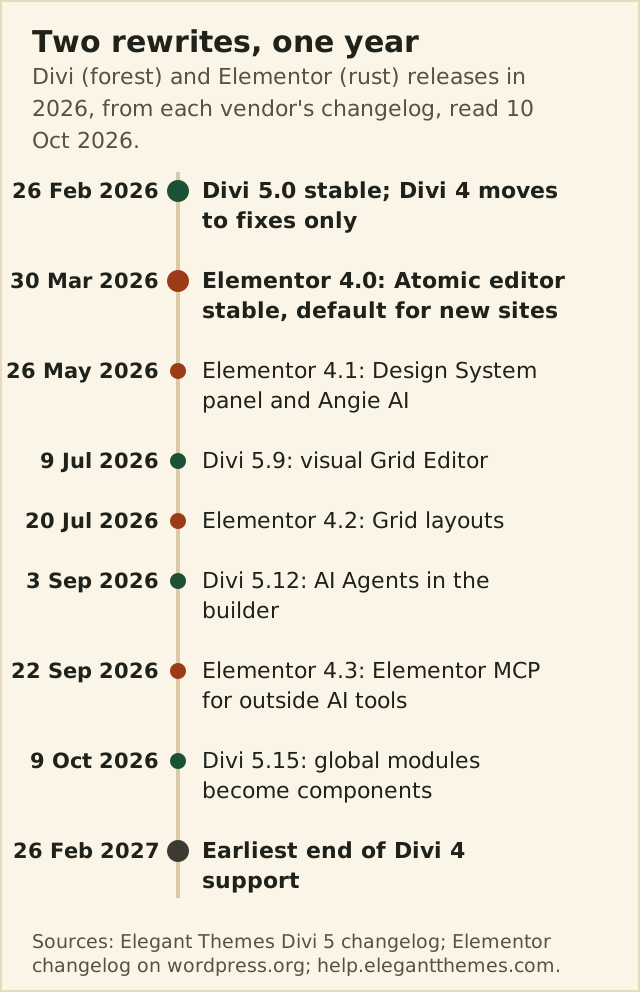
Divi 5 reached its stable release on 26 February 2026, following more than a year of public testing. It is a ground-up rewrite: layouts are no longer stored as shortcodes in the post content but in a structured format, edited in a React-based builder. Elegant Themes has shipped 37 more Divi 5 releases since, reaching 5.15.0 on 9 October 2026, and Divi 4 has moved to a fixes-only track that the company guarantees for at least 12 months after the Divi 5 launch.
Elementor's change was quieter but just as deep. Version 4.0, released on 30 March 2026, marked its Atomic editor as stable and switched it on by default for new websites. The releases since have built out that editor: a Design System panel for variables and classes plus the Angie AI assistant in 4.1 (26 May), Grid layouts in 4.2 (20 July), and Elementor MCP, which lets outside AI tools build and edit pages, in 4.3 (22 September). The current free plugin, 4.3.4, shipped on 5 October.
Elementor also sells a second product family now. Elementor One bundles Editor Pro with monthly credits for AI, image optimisation, accessibility and email deliverability: $180 for the first year on one site, renewing at $228, or One Agency at $432 for the first year and $540 after that, with unlimited sites and 350,000 monthly credits. That is a different purchase from the Pro tiers below, and only worth it if you would use the credits.
Licence maths at 1, 3, 10 and 25 sites
| Plan | Price per year | Sites | Renewal |
|---|---|---|---|
| Elementor Free | $0 | Unlimited | Not applicable |
| Elementor Essential | $60 | 1 | $60, same price |
| Elementor Advanced Solo | $84 | 1 | $84, same price |
| Elementor Advanced | $108 | 3 | $108, same price |
| Elementor Expert | $204 | 25 | $204, same price |
| Divi | $89 | Unlimited | $89 |
| Divi Pro | $277 | Unlimited | $277 |
| Divi Lifetime | $249 once | Unlimited | None |
Run those prices for three years and the curve is clear. On one site, Elementor Advanced Solo costs $252 (Essential, without popups or a store, $180) against $267 for Divi's yearly membership and $249 for Divi Lifetime, so the two are effectively level and features should decide. At three sites Elementor Advanced reaches $324. From four sites to twenty-five, Elementor's one-licence answer is Expert, at $612 over three years; Divi is still $267, or the same $249 you paid once.
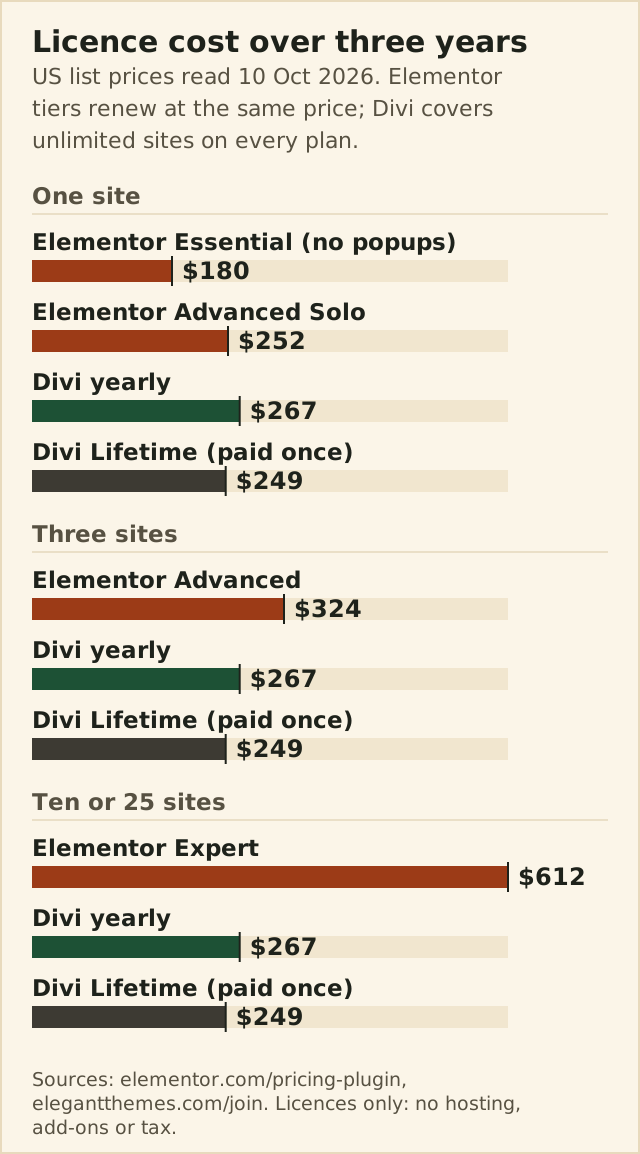
Two refinements matter. First, Elementor's cheapest paid tier is not the one most sites need: Essential at $60 leaves out the Popup Builder, custom code and CSS, and eCommerce features. Advanced Solo at $84 is the realistic single-site plan. Second, Divi's price buys the same rights at any scale, so an agency's tenth client costs Elegant Themes nothing extra to serve and costs you nothing extra to build. Both vendors offer a 30-day money-back guarantee on annual plans.
Editing experience and learning curve
Elementor is the builder most people learn first, and the learning compounds: templates, add-ons, tutorials and freelancers all assume it. The Atomic editor moves Elementor closer to how designers think, with reusable classes and variables managed in one panel, but the drag-and-drop model a beginner meets on day one is the same. Divi edits directly on the page through its Visual Builder, and Divi 5 has added presets, variables, a visual Grid Editor and, since 5.15, components that can be nested and overridden per instance.
Divi asks more of a newcomer before it becomes fast; its settings are deep and its conventions are its own. Once learnt, it rewards people who build many similar sites, which is exactly the audience its licence is priced for. Both now ship AI in the builder: Divi Pro includes $60 a year of AI Agent spend for natural-language editing, while Elementor routes its AI through One credits and, since 4.3, through outside tools connected by MCP.
Performance, stated fairly
We are not printing benchmark scores, because the ones that circulate for both builders come from single-site tests, competitor marketing or screenshots dated years before either rewrite. What can be said from the architecture is narrower and more useful. Divi 5 stores layouts as structured data rather than shortcodes, and its 5.13 release stopped modules that are disabled, or hidden by display conditions, from loading front-end assets. The catch is backward compatibility: a page that still contains one legacy Divi 4 module loads the whole Divi 4 framework.
Elementor's long-standing criticism is heavy wrapper markup and a broad CSS and JavaScript payload. The Atomic editor is Elementor's structural answer, built around reusable classes and variables, but it is the default only for new sites; an existing site built on classic widgets keeps them. For either builder, the honest advice is to measure your own pages on your own hosting, because a slow host or an unoptimised image will cost more than the builder choice.
WooCommerce, popups and forms
| Need | Elementor | Divi |
|---|---|---|
| Popups and overlays | Popup Builder from Advanced Solo ($84) | Off-canvas canvases and interactions in Divi 5; Bloom for email opt-ins |
| Forms | Form Builder on every paid tier | Contact form module; native Gravity Forms module since 5.11 |
| WooCommerce | eCommerce features from Advanced Solo | WooCommerce modules and Theme Builder templates on every plan |
| Headers, footers, archives | Theme Builder on every paid tier | Theme Builder on every plan |
| Custom code and CSS | From Advanced Solo | Included |
| AI | Elementor One credits; MCP since 4.3 | Divi AI and $60 a year of agent spend on Pro |
The pattern is the licence again. Elementor gates its selling and lead-capture tools behind Advanced Solo, so a shop or a lead-generation site should price $84 rather than $60. Divi puts its whole module set on every plan, including WooCommerce templates and, since August, a Payment Button module. If popups are central to your marketing, Elementor's dedicated Popup Builder is the more mature tool; Divi handles slide-ins and overlays through off-canvas canvases triggered by interactions.
Lock-in and leaving either builder
Neither builder is an exit-friendly choice, and neither vendor offers an importer for the other's layouts, so a move between them is a rebuild in both directions. Your posts, media and WordPress data stay put; the page designs do not. That makes the first choice stickier than the price suggests. Over a three-year horizon, the cost of rebuilding twenty pages is larger than any licence difference in the table above.
Renewals are the other half of lock-in. Every Elementor Pro tier renews at its list price, and there is no lifetime licence to buy. Divi is the only one of the two that lets you stop paying: the $249 lifetime licence keeps updates and support coming without a renewal date. If you dislike subscriptions on principle, that settles the question by itself.
Divi 4 users: the support timeline and migration
If you run Divi 4 today, you have time but not forever. Elegant Themes promises Divi 4 a full year of support at minimum, counted from 26 February 2026, which puts the earliest end-of-support date in late February 2027; until then Divi 4 receives security and compatibility fixes, most recently 4.27.9 on 18 September. Moving to Divi 5 is a conversion run by the Divi 5 Migrator, with a compatibility scan first and a restore option immediately afterwards.
Some Divi 4 owners are using the deadline to ask whether to leave for Elementor instead. Treat that as a separate decision: going to Divi 5 converts your existing layouts, while going to Elementor means rebuilding them. If your Divi 4 site leans on third-party modules that have no Divi 5 build, price the rebuild of those pages first. Our Divi review walks through the Migrator step by step.
Who should pick which
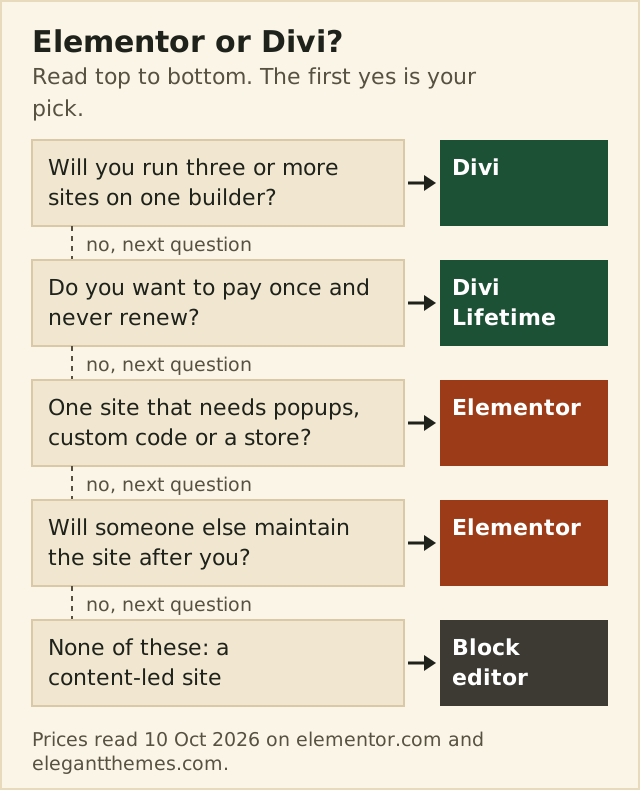
- One business site you may hand to someone else later: Elementor Advanced Solo, for the ecosystem and the familiarity.
- Three or more sites, including client work: Divi, because the licence never counts sites.
- You plan to use the same builder for years and dislike renewals: Divi Lifetime at $249.
- A content-led blog or brochure site: neither; the free block editor covers it.
- Popups or a store on one site: Elementor at $84, not the $60 Essential tier.
For a single site with real layout needs, start with Elementor and buy Advanced Solo once you need popups, custom code or a store. For a portfolio, take the Divi membership and decide on lifetime once you know you will still be using it in year three. Our Elementor review and the page builder roundup cover Bricks, Beaver Builder and Breakdance if neither fits.
Edge cases
- More than 25 sites on Elementor: Expert stops at 25, so you are buying a second licence or One Agency, which is $432 for the first year and $540 after; Divi still costs the same.
- A client who will maintain the site in-house: Elementor, unless they already know Divi.
- A content-heavy site without layout ambitions: the block editor, which costs nothing and adds no builder markup.
- An existing Divi 4 site with stubborn third-party modules: stay on Divi 4 until those modules ship Divi 5 builds, but plan the move before 2027.